Labs64.IO Ecosystem: Guide to Our Architecture

Alright, let’s talk about the initial architecture for Labs64.IO Ecosystem! Think of this as the foundational blueprint for our amazing new ecosystem. We’ve designed it to be robust, scalable, and easy for us developers to work with.
Forget the complex jargon for a moment – let’s break down the core pieces and how they fit together, like LEGO bricks building something awesome.
Imagine a city! Our Labs64.IO Ecosystem is like a bustling, well-organized city. Each part has a job, and they all work together seamlessly to serve our users.
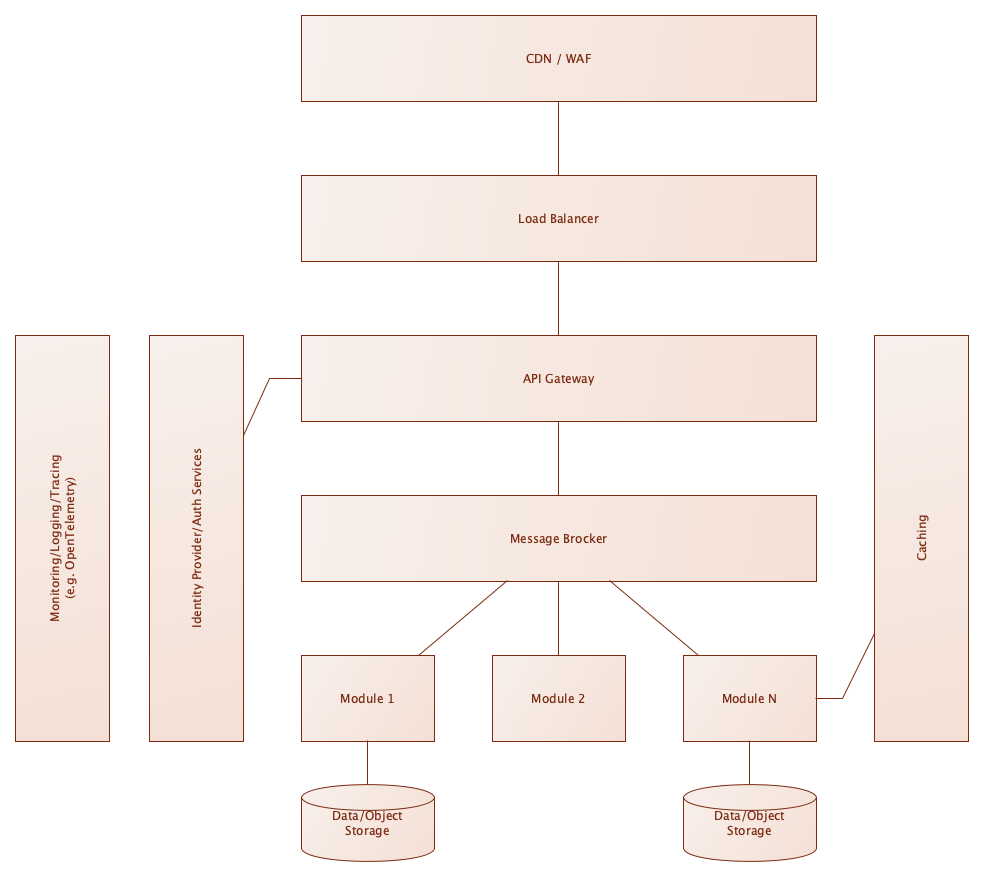
1. The Front Door: CDN & WAF
- What it is: This is our city’s welcome center and security gate, all rolled into one!
- CDN (Content Delivery Network): Think of this as local caches all over the world. When a user asks for something common (like our website’s logo or a standard page), the CDN delivers it super fast from a server close to them, instead of hitting our main systems. This makes Labs64.IO feel snappy and quick.
- WAF (Web Application Firewall): This is our bouncer. It stands at the door, sniffing out any suspicious or malicious requests (like hacking attempts) and blocking them before they even reach our city. Security first!
- What it is for: Less stress for us about global performance or common attack vectors. Our code can focus on features, not fighting off bad guys.
2. The Traffic Cop: Load Balancer
- What it is: Once past the CDN/WAF, requests hit our Load Balancer. This is like a smart traffic cop directing vehicles (user requests) to the right roads. If we have multiple copies of our application running (which we will for reliability and speed), the Load Balancer ensures no single server gets overwhelmed.
- What it is for: It allows us to easily scale our applications by adding more “modules” (servers) without users noticing. It also helps with high availability – if one server has an issue, the Load Balancer just sends traffic to another healthy one.
3. The Central Hub & Gatekeeper: API Gateway
- What it is: This is our city’s main terminal building. All legitimate traffic flows through here.
- It acts as a single entry point for all API requests.
- It can route requests to the correct “module” based on the request.
- It can perform initial checks and transformations before sending requests deeper into our system.
- What it is for: It simplifies how external systems or our own front-end applications interact with our services. We define our public APIs (OpenAPI based) here, providing a clear contract for everyone.
4. The Identity Bureau: Identity Provider / Auth Service
- What it is: This is the part of our city that handles all things related to who you are. When a user logs in or signs up, this service verifies their identity and manages permissions (what they’re allowed to do).
- What it is for: We don’t have to write authentication and authorization code in every single module. We offload this complex and crucial security aspect to a dedicated service, ensuring consistency and strong security practices across Labs64.IO.
5. The Brains of the Operation: Modules (1, 2, N)
- What they are: These are the actual workers in our city – our microservices or core application components. Each “Module” is responsible for a specific piece of our Labs64.IO functionality (e.g., Module 1 might handle user profiles, Module 2 might manage lab experiments, Module N could be billing). They are designed to be independent so they can be developed, deployed, and scaled individually.
- What it is for:
- Focus: You can focus on building one specific feature without worrying about the entire system.
- Isolation: Bugs in one module are less likely to bring down the entire system.
- Flexibility: We can use different technologies or programming languages for different modules if it makes sense (though we’ll aim for consistency initially).
6. The Whisper Network: Message Broker
- What it is: This is like the internal postal service or radio station for our modules. Instead of modules talking directly to each other (which can get messy), they can send messages to the Message Broker. Other modules interested in that message can then pick it up. This is great for asynchronous tasks – “Hey, I just updated a user’s profile, let others know if they care!”
- What it is for:
- Decoupling: Modules don’t need to know about each other directly, which reduces dependencies and makes changes easier.
- Resilience: If one module is down, messages can queue up and be processed when it’s back online.
7. The Memory Banks: Data / Object Storage
- What it is: This is where our city keeps all its important records and files. This includes our databases (for structured data like user info, experiment results) and object storage (for unstructured files like images, large datasets).
- What it is for: It provides the persistent storage our applications need. We can choose the right type of storage for the job – a super-fast transactional database for user data, or scalable object storage for lab reports.
8. The Eyes & Ears: Monitoring, Logging, Tracing
- What it is: This is our city’s surveillance system and audit trail.
- Monitoring: Dashboards and alerts that tell us if our systems are healthy, fast, or if something is going wrong.
- Logging: Every component writes down what it’s doing, creating a detailed historical record of events.
- Tracing: This lets us follow a single user request as it travels through all the different modules, helping us debug complex issues in distributed systems.
- What it is for: In a complex system, knowing what’s happening is half the battle. These tools give us the visibility we need to quickly identify and fix problems, understand performance bottlenecks, and ensure everything is running smoothly.
9. The Scratchpad: Caching
- What it is: This is like a quick-access notepad for our modules. If a piece of data is frequently requested but doesn’t change often, we store a copy of it in a super-fast cache. This avoids hitting the slower main database repeatedly.
- What it is for: It significantly speeds up read operations for common data, improving the overall responsiveness of Labs64.IO without complex code changes in our modules.
What’s Next?
This initial architecture is a strong foundation. As we build out Labs64.IO Ecosystem, we’ll dive deeper into:
- Specific Technologies: Which databases, message brokers, and caching solutions will we use?
- Deployment: How do we get our code from our laptops to these components in a reliable and automated way (CI/CD)?
- Scaling Strategies: How do we make sure our city can handle millions of users and petabytes of data?
For now, understand these core components and how they interact. This will empower you to build robust, scalable, and high-performing features for Labs64.IO! If you have any questions, don’t hesitate to ask – we’re building this amazing ecosystem together!
Image Credits: Labs64.IO
Related Posts


Configuring Traefik Middleware for Kubernetes

Spring Cloud Gateway Routing for Microservices