The Labs64.IO Ecosystem Explained: Understanding Our Project Structure
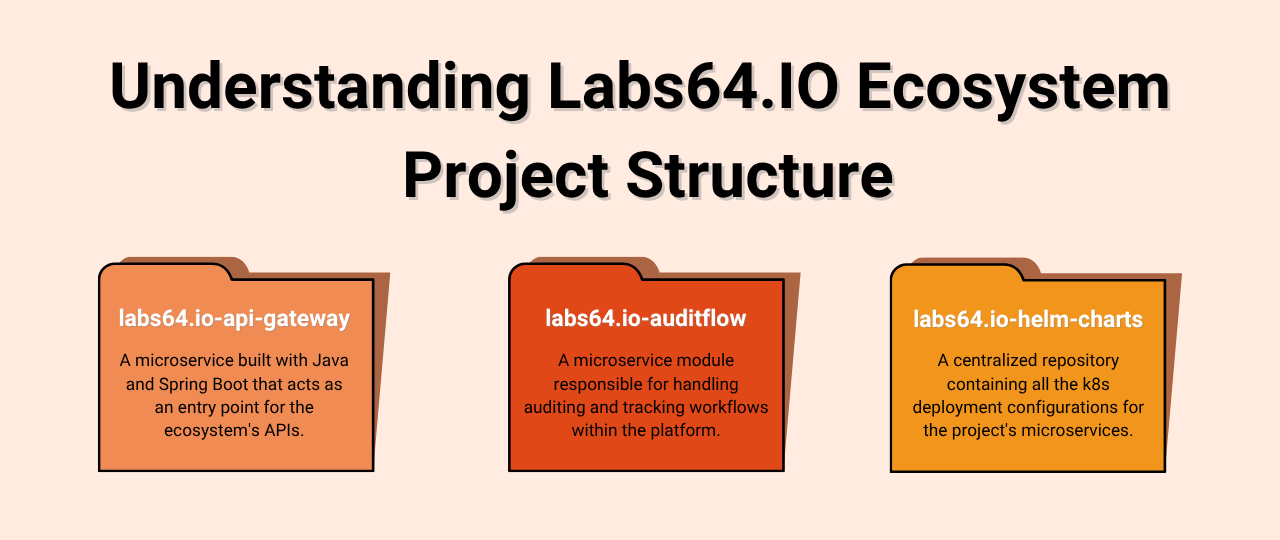
Welcome to the Labs64.IO developer community! Our platform is built on a robust microservices architecture, leveraging specific tech stacks for both application development and deployment. Understanding this structure from a technology perspective will empower you to quickly find your way around and contribute effectively.
At a high level, our project is segmented into two primary areas: the individual Application Modules (our microservices) and their corresponding Deployment Configurations for Kubernetes. This clear separation ensures modularity, independent development, and efficient deployment.
1. Application Modules: Java/Spring Boot Microservices
You’ll notice directories like labs64.io-api-gateway at the top level. It’s crucial to understand that this is just one example of many such directories, each representing a distinct microservice within the Labs64.IO Ecosystem. In the future, you’ll find similar structures for other modules like labs64.io-auditflow, labs64.io-payment-gateway, labs64.io-invoice-management, and more.
Each of these application module directories typically houses a Java application built with Spring Boot and managed by Maven. Here’s how they are organized from a tech stack perspective:
- Java Source Code (
src/): This is where the core business logic for each microservice resides. All our Java code, following standard Maven conventions, is here, organized into packages that reflect the service’s functionality. This includes API endpoints, service implementations, and data models. Crucially, the accompanying test suites are also found here, ensuring the quality and reliability of each service. - Maven for Build & Dependency Management: At the heart of each Java module is a
pom.xmlfile. This Maven Project Object Model defines how the application is built, manages all its Java dependencies, and orchestrates various build lifecycle phases. It ensures consistent builds across all development environments. - Containerization with Docker: For each microservice, a
Dockerfileis present. This defines the steps to package the Java application into a lightweight, portable Docker container. This containerization is fundamental to our ability to deploy our services consistently across various environments, especially Kubernetes. - Automation with
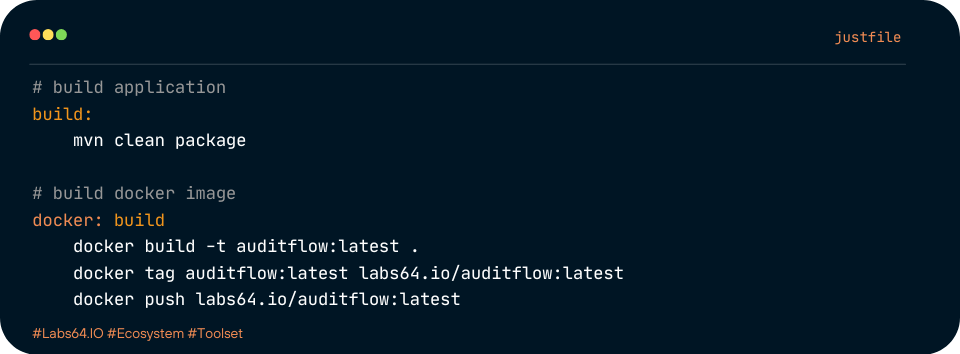
just: To streamline common developer tasks like building, running tests, or even starting a service locally, you’ll find ajustfilein each module. This tool provides simple, script-like commands that abstract away complex build or run instructions. - CI/CD Integration (
.github/): Each microservice integrates with GitHub Actions via its.github/directory. This houses our Continuous Integration and Continuous Deployment (CI/CD) workflows, which automatically build, test, and containerize our applications whenever code changes are pushed.
In essence, each labs64.io-* directory represents an independently deployable, Java-based microservice, adhering to a consistent development and build pattern.
2. Deployment Configurations: Kubernetes & Helm Charts
Separate from our application code, the labs64.io-helm-charts directory is dedicated to defining how all our microservices and their essential infrastructure components are deployed onto Kubernetes. This entire section revolves around the Helm package manager for Kubernetes.
- Centralized Chart Repository (
charts/): This core directory contains individual Helm charts for each of our microservices (e.g.,api-gateway,auditflow). Each chart is a self-contained package defining all the Kubernetes resources (Deployments, Services, ConfigMaps, etc.) needed to run a specific microservice. - Configuration with
values.yaml: Within each Helm chart, thevalues.yamlfile is paramount. It allows us to customize the deployment of a service without altering its core Kubernetes definitions. This is how we manage environment-specific settings (like image versions, resource requests, or feature flags) for ourapi-gateway,auditflow, and other services across different Kubernetes clusters. - Kubernetes Manifest Templates (
templates/): These files are the heart of our Helm charts. Written in Go templating language, they dynamically generate the actual Kubernetes YAML manifests. This templating allows us to create flexible and reusable deployment definitions for all our services. - Shared Chart Libraries (
chart-libs/): To avoid duplication and promote consistency, this directory contains reusable Helm chart components or sub-charts that can be leveraged across multiple service charts. - Managing Third-Party Infrastructure: A crucial aspect of our deployment is the
third-party/directory withinlabs64.io-helm-charts. This is where we manage Helm charts for essential external infrastructure that our microservices rely on. This includes:- Observability: Charts for tools like Grafana, Loki, Prometheus, Tempo, and OpenTelemetry (Otel), ensuring we have comprehensive logging, metrics, and distributed tracing capabilities for our entire Ecosystem.
- Messaging & Data Streaming: Charts for Kafka and RabbitMQ, enabling asynchronous communication and data pipelines between our services.
- Search & Analytics: A chart for OpenSearch, providing robust search and analytics functionalities. This centralized management of third-party dependencies through Helm simplifies the deployment and operational overhead of our entire platform.
- Automation for Charts (
justfile&.github/): Similar to the application modules, this section also uses ajustfilefor common Helm-related tasks (like linting charts or packaging them). The.github/directory here handles the CI/CD pipelines specifically for our Helm charts, ensuring they are validated and released consistently.
The Power of This Structure
This modular, tech-stack-centric organization offers significant advantages:
- Clear Ownership: Each microservice team can focus on their specific Java application and its corresponding Helm chart.
- Independent Deployments: Microservices can be developed, tested, and deployed independently, accelerating development cycles.
- Consistent Environment Management: Helm charts provide a declarative way to manage our entire Kubernetes environment, from our custom applications to their foundational infrastructure dependencies.
- Scalability & Resilience: This architecture naturally supports horizontal scaling and improves system resilience by isolating failures within individual services.
We encourage you to explore these directories and their underlying technologies. By understanding how our Java applications are built and how our Kubernetes deployments are managed, you’ll be well-equipped to contribute to the Labs64.IO Ecosystem!
Image Credits: Labs64.IO
Related Posts

Master Kubernetes Probes for Reliable Services